
Abode
Abode Systems Inc.Lifestyle
2.3713.00 Reviews
- Version
- Varies With Device
- Installs
- 100.00K
- Age Rating
- Everyone
Screenshots
Our Review of Abode
 Analysis by Appyee
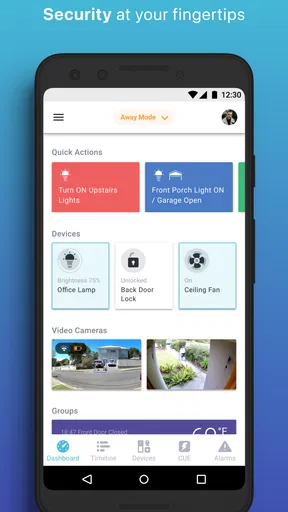
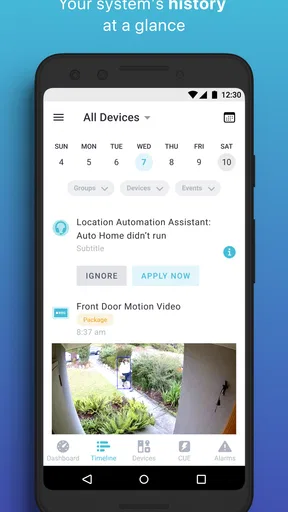
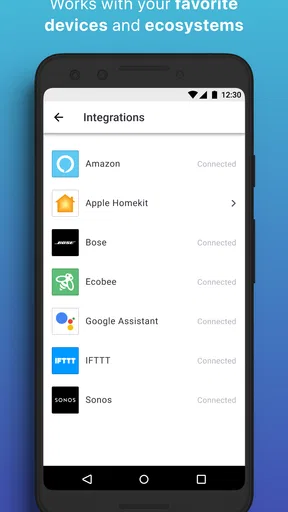
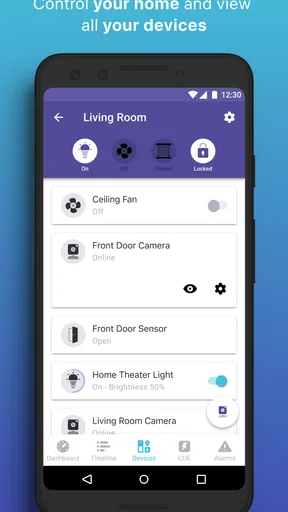
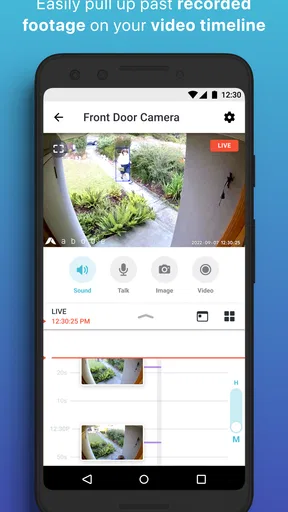
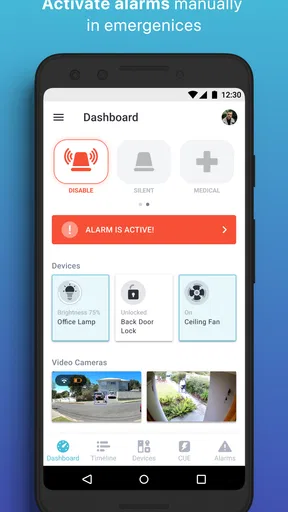
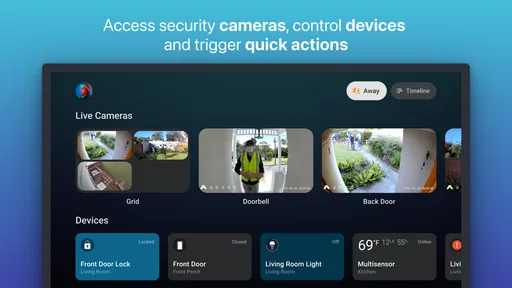
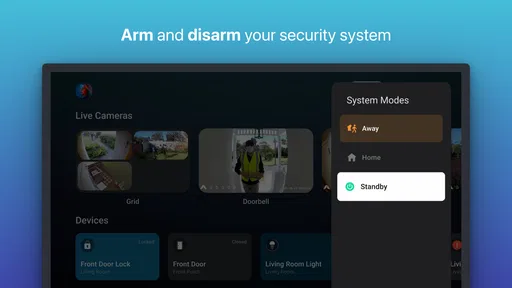
Abode is a free lifestyle app from Abode Systems Inc. that I would describe as a control point for people who want to manage home security without committing to a long-term contract. Its appeal is not simply that it puts security information on a phone. The more important idea is flexibility: you can check and manage your home from the same place while keeping the decision to expand or continue in your own hands.
I spent time looking at it as an everyday home-security tool rather than treating it like a simple alarm companion. That distinction matters. A security app is only useful if it helps you make a quick decision when you are away, gives you a clear view of what is happening, and does not make ordinary routines unnecessarily complicated. Abode has a sensible foundation, but the experience is not equally convincing for everyone. Its average rating of 2.3 from around 1.7 thousand ratings suggests that many users have encountered friction, and that should be part of the buying decision rather than something to ignore.
Flexible security is the capability that defines Abode
The central strength here is the ability to approach home security without being locked into a long-term contract. That changes the way I would use the service. Instead of viewing security as a permanent package that must be accepted all at once, I see Abode as a more adaptable option for renters, homeowners testing a new setup, or anyone who wants to decide gradually how much protection is worthwhile.
That flexibility is especially useful when your circumstances change. Someone moving between homes, renovating a property, or spending only part of the year at a second residence may not want a traditional arrangement that feels difficult to leave. Abode’s contract-free positioning makes the app more attractive in those situations because the security plan can fit around the household instead of defining it.
Still, “no long-term contract” should not be confused with “no ongoing decisions.” You still need to think about what equipment or service arrangement suits your home, how alerts fit into your routine, and who should be able to respond if something happens. The app can support those choices, but it cannot make the underlying security plan sensible for you.
I also like that the app is free to install and carries an Everyone content rating. That makes it approachable for a household where more than one person may need access. The free download is only the starting point, however, because in-app purchases range from $3.99 to $245.99 per item. I would therefore treat the app as an entry point into the Abode ecosystem, not assume that every useful part of a complete security setup is included at no cost.
Why this matters more than a simple alarm button
Many security products are easy to understand in a showroom: install a device, open an app, and receive an alert. The harder question is what happens after that alert. A flexible system is valuable when it lets you adjust your level of involvement. You may want a basic arrangement while traveling, a more active setup when a property is empty, or a different routine when several people are coming and going.
In my view, Abode’s real promise is not that it eliminates every security worry. It is that it gives you a way to keep the household’s security decisions closer to your own schedule. That is a meaningful advantage over services that feel designed around a fixed package and a fixed commitment.
How I would use the app during an ordinary day
The most realistic scenario is a household leaving for work and school in the morning. One person can use the app as part of the departure routine, checking the home’s security state before the last door closes. Later, if a family member needs to return unexpectedly, the household can adjust its plan rather than relying on a single person to remember every step.
That workflow sounds simple, but simplicity depends on consistency. I would create a habit around checking the app at the same moments each day: leaving home, arriving back, and preparing for bed. The benefit is less about staring at the phone and more about reducing uncertainty. Instead of wondering whether the home was left in the intended state, I can use a deliberate check before moving on.
A second useful situation is a short trip. Before leaving, I would review the setup and make sure the people who may need to know about an alert understand their role. During the trip, I would avoid repeatedly opening the app without a reason. Security tools can become stressful when every notification feels urgent, so a clear response plan is more useful than constant checking.
For a rental property or a home that is empty between occupants, the contract-free approach may be more compelling than it is for a settled family home. The person responsible for the property can decide how much security makes sense during the vacancy, then reassess when the property’s use changes. That is one of the less obvious advantages of flexible security: the value is highest when the situation itself is temporary.
Practical habits that make the experience better
My first tip is to separate “checking status” from “responding to an incident.” If I open the app casually throughout the day, I may become less attentive when a genuine alert appears. I would use routine checks sparingly and reserve a specific response process for unusual activity.
My second tip is to agree on household responsibilities before anyone needs them. If several people use the system, confusion can arise over who is watching for alerts, who is returning home, or who should contact someone nearby. The app can be part of that arrangement, but the arrangement itself should be discussed offline. This is particularly important when children, older relatives, or occasional guests are involved.
My third tip is to judge the service by the complete cost of the setup, not by the free download. The available in-app purchase range is broad enough that the final expense can vary substantially. I would decide first what problem I am trying to solve, then check whether the required additions are reasonable. Buying features just because they are available is a poor substitute for a clear security plan.
The strongest use case is a changing home situation
If I were recommending Abode to a friend, I would start with someone whose housing situation is flexible. A renter who does not want a lengthy commitment, a homeowner experimenting with a new security arrangement, or a person managing a property that is not occupied all year may gain more from Abode than someone seeking a fully managed, hands-off service.
Imagine a friend who has just moved into a new house and is unsure whether a traditional security contract is worthwhile. I would suggest using Abode as a way to begin with a manageable approach, observe how the household actually behaves, and decide later whether a larger investment is justified. That staged decision is more realistic than trying to predict every need before living in the space.
It can also suit people who dislike the feeling of being tied to a provider. The absence of a long-term contract gives the user more room to reconsider. That does not guarantee a perfect experience, but it lowers the psychological barrier to trying a security service in the first place.
On the other hand, I would not make it my first recommendation for someone who wants a security company to handle every decision. If your priority is professional monitoring, immediate human intervention, or a tightly managed package, a conventional monitored service may be a better fit. Abode’s flexibility is an advantage only if you are comfortable taking responsibility for the choices around it.
Where the everyday experience can become frustrating
The rating of 2.3, based on around 1.7 thousand ratings, is a clear warning that the practical experience has not been smooth for everyone. I would not treat that figure as proof that the app will fail on every phone, but I would take it seriously. Security software has a higher standard than an occasional entertainment app: delays, confusing states, or unreliable notifications can undermine confidence quickly.
That is why I would test the complete routine before depending on Abode during a long trip. I would install it, learn the controls, involve the people who may need access, and confirm that the workflow makes sense in the home’s real schedule. A system that looks clear while sitting on a sofa may feel very different when someone is rushing out the door or trying to respond from another location.
Another trade-off is the balance between independence and responsibility. A contract-free system may feel liberating, but it also means I cannot simply assume that a provider will solve every situation for me. I need to understand the plan, keep contact arrangements current, and decide what action is appropriate when an alert arrives. That is not a flaw in the app alone; it is part of choosing a more flexible security model.
The purchase range also deserves careful attention. Although the app itself is free, the difference between a low-cost trial and a more complete setup can be substantial. I would avoid making a decision based solely on the download price. The right question is whether the total arrangement gives enough practical value for the home, not whether the first step costs nothing.
How Abode compares with familiar alternatives
Compared with a basic camera or notification app, Abode is aimed at a broader security relationship. A camera app may be excellent for checking one room, but it can leave the user piecing together separate routines for the rest of the home. Abode’s appeal is that it is intended to be a more central security solution rather than just a window into a single device.
Compared with traditional alarm providers, the difference is commitment. A conventional provider may be preferable when you want a standardized package, professional oversight, and a service relationship that requires less personal management. Abode is more attractive when you want control over the arrangement and do not want to begin with a long-term obligation.
There is also a middle ground between those choices. Some people may prefer a collection of smart-home products that they configure independently. That route can offer more freedom, but it may also create a fragmented experience, with separate apps and separate alert systems. Abode’s value is strongest if its unified approach saves enough effort to justify choosing its ecosystem instead of assembling everything piece by piece.
I would not call one option universally better. The choice depends on whether your priority is flexibility, professional support, low initial commitment, or maximum control over individual devices. Abode leans toward user-managed flexibility, and that should be understood before installation.
Who is most likely to benefit
Abode is best suited to people who want a flexible home security app and are willing to stay involved in how it is used. Renters, new homeowners, people managing temporary vacancies, and households that dislike long contracts are the clearest matches. The app’s free availability and Everyone rating also make it easy to introduce into a shared household without making the first step feel intimidating.
It may also work well for a technically comfortable user who enjoys adjusting a home setup over time. Such a person is more likely to appreciate the freedom to start modestly, learn what the household needs, and spend more only when a real need appears. That is a better approach than buying a large package before understanding daily behavior.
I would be more cautious recommending it to someone who rarely checks a phone, dislikes configuring services, or expects security to operate entirely in the background. The app can be part of a dependable routine, but it cannot replace attention, planning, or a response decision. If those responsibilities sound burdensome, a more managed alternative may be worth the extra cost.
Likewise, anyone choosing it for an especially important property should test the whole workflow before relying on it. I would check how the household handles normal arrivals, unexpected visits, travel, and alert responsibility. The point is not to create anxiety; it is to discover friction while the stakes are low.
My final view after weighing the trade-offs
Abode has a clear reason to exist: it offers a more flexible route into home security, with the freedom to avoid a long-term contract and shape the arrangement around real life. That makes it more interesting than a generic alarm companion, especially for people whose homes or schedules are changing.
My recommendation is conditional rather than automatic. I would choose it if I wanted control, preferred to make my own security decisions, and was prepared to evaluate the complete cost beyond the free installation. I would skip it in favor of a more managed provider if I wanted professional intervention or did not want to maintain a household response routine.
The developer, Abode Systems Inc., has positioned this as a lifestyle-oriented security tool that has been available since October 21, 2015, and it has passed the threshold of over one hundred thousand installs. Those figures show that the app has reached a meaningful audience, but the modest average rating means I would approach it with practical testing rather than blind confidence.
In the end, Abode is most convincing when flexibility is the feature you genuinely need. It gives a renter, new homeowner, or temporary property manager room to start without a long commitment. Just remember that freedom comes with responsibility: understand the costs, build a response routine, and make sure the app fits the way your household actually lives.
Verdict
Strengths of Abode
- Clean, intuitive interface that makes browsing and reading content straightforward.
- Supports multiple file formats for convenient document access in one app.
- Cloud syncing keeps files available across supported devices and platforms.
- Useful annotation tools help highlight, comment on, and organize document content.
- Reliable sharing options make it easy to send files to colleagues or friends.
Limitations of Abode
- Some advanced editing and conversion tools require a paid subscription.
- Large documents can take time to load on older phones or slower connections.
- The app may use considerable storage when many files are saved offline.
- Account sign-in is often needed to unlock the full range of features.
- Occasional formatting differences may appear when opening complex documents.
Similar Picks in This Category
View All
SmartThings
Samsung Electronics Co., Ltd.4.6

Google Home
Google LLC4.0

Pinterest4.2

Astrotalk - Talk to Astrologer
Astrology & Horoscope4.7

My Verizon
Verizon Consumer Group4.5

Samsung Wallet (Samsung Pay)
Samsung Electronics Co., Ltd.4.1
Frequently Asked Questions
What is Adobe, and what can I use it for?
Adobe is a collection of creative and productivity applications rather than one single app. Depending on the product you choose, you can edit photos, design graphics, create PDFs, edit videos, draw illustrations, or manage documents. Popular options include Photoshop, Lightroom, Acrobat Reader, Illustrator, Premiere Rush, and Adobe Express. Each app has different tools, system requirements, and subscription conditions, so it is important to check the specific application before downloading.
Is Adobe free to download and use?
Most Adobe mobile applications are free to download, but the available features vary considerably. Basic tools may be accessible without payment, while advanced editing functions, premium templates, cloud storage, export options, or professional tools may require an Adobe Creative Cloud subscription or an in-app purchase. Some applications offer trials, but users should review the pricing and renewal terms carefully before activating a paid plan.
Do I need an Adobe account to use the app?
An Adobe account is commonly required for accessing cloud features, synchronizing projects, managing subscriptions, and using premium tools. Some basic functions may work without signing in, depending on the application, but creating an account generally provides a more complete experience. Signing in also allows your files, preferences, and projects to be available across compatible devices, although this may require an internet connection.
Can Adobe apps work offline on Android and iOS?
Many Adobe apps provide at least some offline functionality, but the exact limitations depend on the product and feature being used. You may be able to edit locally stored files without an internet connection, while cloud documents, online fonts, premium assets, account verification, and synchronization usually require access to the internet. It is recommended to open and prepare important projects while connected before working offline.
Are Adobe apps suitable for beginners, and what devices do they require?
Adobe offers products for both beginners and experienced creators, although some professional applications can feel complex at first. Apps such as Adobe Express and Acrobat Reader are generally approachable, while Photoshop, Lightroom, and Premiere tools may require more time to learn. Performance depends on your phone or tablet, available storage, operating-system version, memory, and screen size, so checking the official requirements is advisable before installation.
